
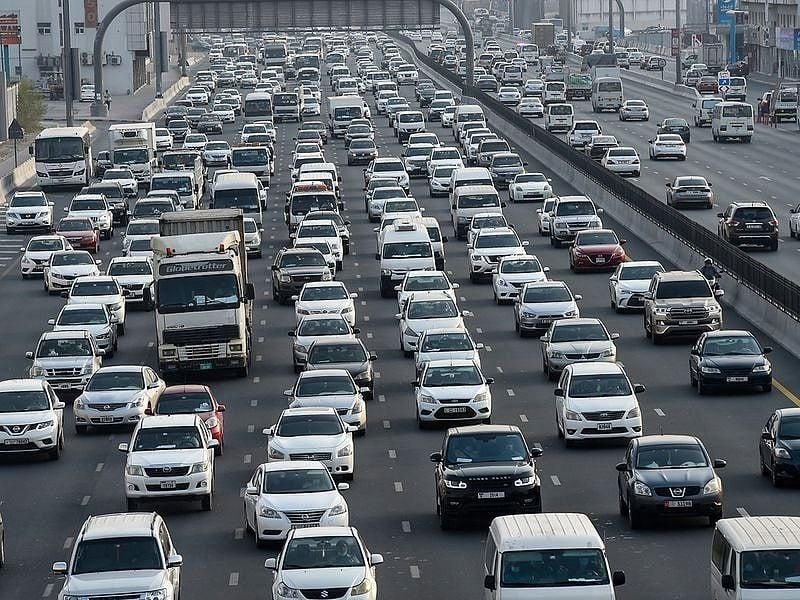
Motorists travelling between Dubai and Sharjah encountered heavy traffic during the morning commute on Monday, October 12, with congestion reported on several major roads linking the two emirates.
A traffic update published by Gulf News at 7:05am UAE time identified Sheikh Zayed Road (E11), Al Ittihad Street and Sheikh Mohammed bin Zayed Road (E311) among the affected routes. Slow-moving traffic was also reported on roads serving residential and commercial districts in Sharjah.
The congestion could affect commuters travelling to workplaces, schools and other morning appointments. However, the reported conditions represent an early-morning snapshot, and traffic levels may change as the day progresses.
Which roads were affected by heavy traffic?
Sheikh Zayed Road (E11) and Al Ittihad Street were among the main congestion points identified in the morning update. These routes carry traffic between Dubai and Sharjah, including motorists travelling through the Al Nahda and Al Taawun areas.
Sheikh Mohammed bin Zayed Road (E311) was also reported to have long queues, particularly on the northbound approach towards Sharjah. Drivers heading through the industrial districts and towards the emirate boundary were advised to allow extra time.
Within Sharjah, traffic was described as slow on roads serving Al Majaz and Al Khan, where vehicles feed into wider arterial routes. Congestion on connecting roads can affect journey times even after motorists leave the main highway.
The report did not establish that accidents caused the delays, so motorists should check current traffic information before assuming that a collision or road closure is responsible.
Can motorists use an alternative route?
Emirates Road (E611) was identified in the morning report as a potentially less congested alternative to the central commuter corridors. Its suitability depends on the driver’s starting point, destination and current traffic conditions.
Taking a different highway does not automatically mean a shorter journey. An alternative may add distance, while congestion on connecting roads can reduce any time saved.
Motorists should compare estimated journey times before choosing a route rather than diverting solely because one road appears busy.
How to check Dubai traffic before leaving
Dubai’s Roads and Transport Authority (RTA) provides traffic information through its Smart Drive navigation application. The service includes real-time traffic conditions, estimated journey times, information about roadworks and accidents, and automatic route adjustments.
Drivers can also use live navigation services to check congestion along their intended route. Because traffic conditions can change quickly, it is sensible to check again shortly before departure.
For commuters travelling regularly between the two emirates, allowing a time buffer can help reduce the impact of unexpected delays on work and school schedules.
Safety reminders for drivers
Heavy congestion requires patience and careful driving, particularly where several lanes merge or vehicles enter and leave busy highways.
Motorists should maintain a safe following distance, signal before changing lanes and avoid sudden manoeuvres. Checking navigation information before driving also helps reduce the temptation to handle a phone while behind the wheel.
Drivers should follow posted signs and instructions from traffic authorities. An alternative route should only be taken when it is safe and legally permitted.
The latest reported traffic conditions were recorded early on Monday morning. Commuters should consult live updates for the most relevant information before setting out on the Dubai–Sharjah corridor.
1. Where was heavy traffic reported between Dubai and Sharjah?
The October 12 morning report identified Sheikh Zayed Road (E11), Al Ittihad Street and Sheikh Mohammed bin Zayed Road (E311) as affected routes. Congestion was also reported on connecting roads in Sharjah.
2. When was the Dubai–Sharjah traffic update published?
The report was last updated at 7:05am UAE time on Monday, October 12, 2026. These observations do not establish current conditions later in the day.
3. Was Sheikh Zayed Road affected?
Yes. The morning report listed Sheikh Zayed Road among the routes experiencing heavy congestion.
4. Was Sheikh Mohammed bin Zayed Road (E311) congested?
Yes. Long tailbacks were reported on sections of E311 approaching the Sharjah boundary, particularly for northbound traffic.
5. Is Emirates Road (E611) an alternative?
The morning report described E611 as comparatively less congested. Drivers should compare live journey times because the route may add distance and conditions can change.
6. How can drivers check live traffic in Dubai?
Drivers can use the RTA Smart Drive application, which provides traffic information, journey-time estimates, roadworks and accident information. Live navigation services are another option.
7. Were accidents confirmed as the cause of the traffic?
The available report identifies congestion but does not establish that accidents caused the delays. Drivers should consult current official traffic updates for confirmed incidents.
8. What should commuters do before leaving?
Check live traffic, allow extra travel time and choose a route based on current conditions. Drivers should avoid using handheld phones while driving and maintain a safe distance in slow-moving traffic.
