
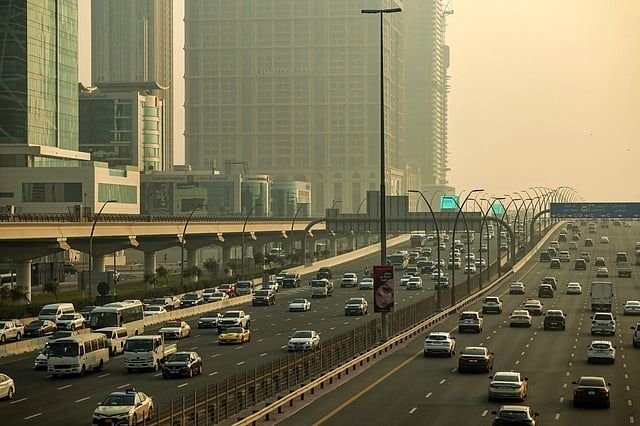
DUBAI — Motorists travelling across Dubai and between Dubai and Sharjah should check live traffic conditions before setting out, particularly if their journeys involve major highways and busy connecting roads.
A Gulf News traffic report published on October 19 identified congestion on sections of Al Ittihad Road (E11), Sheikh Mohammed bin Zayed Road (E311) and Sheikh Zayed Road. Slow-moving traffic was also reported around Business Bay, Al Quoz and Jumeirah Village Circle (JVC).
These locations are useful reference points for commuters planning their journeys, but the October 19 observations should not be treated as confirmation of traffic conditions on October 20.
Dubai–Sharjah routes to monitor
The daily commute between Dubai and Sharjah can involve several major roads and connecting interchanges. Motorists travelling through Al Nahda, Al Qusais and nearby border areas should check their route before departure.
Recent traffic reporting identified slow movement on Al Ittihad Road (E11), particularly around the Al Nahda and Al Qasimia areas, with congestion extending towards the Dubai–Sharjah border. Sections of Sheikh Mohammed bin Zayed Road (E311) were also affected near the border and junctions serving Muhaisnah.
Drivers heading towards Dubai should compare current journey times before choosing a route, as conditions can vary between individual sections of the same highway.
Business Bay, Al Quoz and JVC
Within Dubai, commuters should also monitor the roads serving Business Bay, Al Quoz and Jumeirah Village Circle.
The October 19 report identified slow-moving traffic on Sheikh Zayed Road and Al Khail Road (E44), including areas near Business Bay, Al Quoz and the Meydan Hotel interchange. Congestion was also reported on Hessa Street (D61) near JVC and Dubai Sports City, along with sections of Umm Suqeim Street (D63).
Motorists travelling through these areas should check their navigation apps for current journey times rather than relying on previously reported delays.
Airport routes and connecting roads
Drivers heading to Dubai International Airport should allow sufficient time for their journeys and check the approach roads before leaving.
The October 19 report also identified slow-moving traffic around Al Rashidiya and Nad Al Shamma. However, these observations relate to the earlier morning update and do not establish whether the same locations are congested today.
Passengers travelling to catch flights should account for possible road delays when planning their departure from home or work.
Dubai Police road safety reminder
Dubai Police reminded motorists in the October 19 report to use indicators before changing lanes or turning. Signalling gives other drivers a clearer indication of a vehicle’s intended movement and helps them respond safely.
Drivers should avoid sudden lane changes, maintain a safe following distance and remain attentive when approaching junctions or slow-moving traffic.
How to check Dubai traffic before leaving
Motorists can use the live traffic layer in Google Maps to review congestion and reported incidents along their intended route. They should check conditions again shortly before departure, particularly when travelling during busy commuting periods.
For journeys between Dubai and Sharjah, comparing estimated travel times across available routes can help drivers decide whether an alternative is practical.
The key point for commuters on October 20 is to verify the latest conditions before travelling. Traffic reports from previous mornings can provide useful context, but they cannot confirm which roads are congested at the time of departure.
Q1. Which roads were reported congested in Dubai?
A Gulf News report dated October 19 identified congestion on sections of E11, E311 and Sheikh Zayed Road, as well as roads around Business Bay and Al Quoz. These are historical observations, not a verified live update for October 20.
Q2. Is traffic heavy between Dubai and Sharjah today?
The exact traffic conditions for October 20 could not be independently confirmed. Check a live navigation service before starting your journey.
Q3. Is Sheikh Zayed Road affected by traffic?
Sheikh Zayed Road was among the routes affected in the October 19 morning report. Its current conditions need to be checked separately.
Q4. Is Al Khail Road experiencing congestion?
Al Khail Road (E44) had slow-moving sections in the October 19 report, including around Business Bay and Al Quoz. Check live traffic information for today’s conditions.
Q5. How can motorists check Dubai traffic conditions?
Drivers can use Google Maps or another live navigation service to review traffic levels, reported incidents and estimated journey times.
Q6. What should drivers do during heavy traffic?
Allow extra travel time, maintain a safe following distance, signal before changing lanes and avoid sudden manoeuvres.
Q7. Are the reported traffic conditions still current?
Not necessarily. The specific road observations cited here are from October 19, 2026, and may have changed.
